
Capture the right data
Add custom fields and adjust form properties around real operational information.
ERP customisation should make ERPNext fit real business processes without turning the system into an unmaintainable collection of changes. Customise forms, fields, print formats, reports, permissions, workflows and business-specific functionality with a controlled, upgrade-aware approach.

Add custom fields and adjust form properties around real operational information.
Create customised print formats for quotations, invoices, orders and internal records.
Align roles, permissions and field-level access with real responsibilities.
Create report views and decision-support outputs around the data users actually need.
ERP customisation should start with standard configuration, then move to metadata, workflow logic, custom applications or integrations only when the requirement justifies the extra complexity.
Use built-in modules, system settings, naming, roles, permissions, workflow states and document behaviour before introducing custom code.
Add business-specific information, form layouts, reporting views and branded document outputs using front-end customisation tools.
Model approval states, access rules, permission levels and user-specific restrictions around documented responsibilities.
Use Frappe custom apps, hooks and REST APIs when the requirement needs a larger extension that standard configuration cannot safely provide.
ERP customisation is easier to maintain when teams use the platform’s real configuration tools. These official ERPNext and Frappe interfaces show the practical tools behind form customisation, print design, permissions and reporting. For implementation reference, see the official ERPNext customisation documentation and Frappe Framework documentation.

ERPNext’s Print Format Builder supports drag-and-drop fields, custom text and HTML for user-editable document layouts. More advanced formats can also be built when the standard builder is not enough.
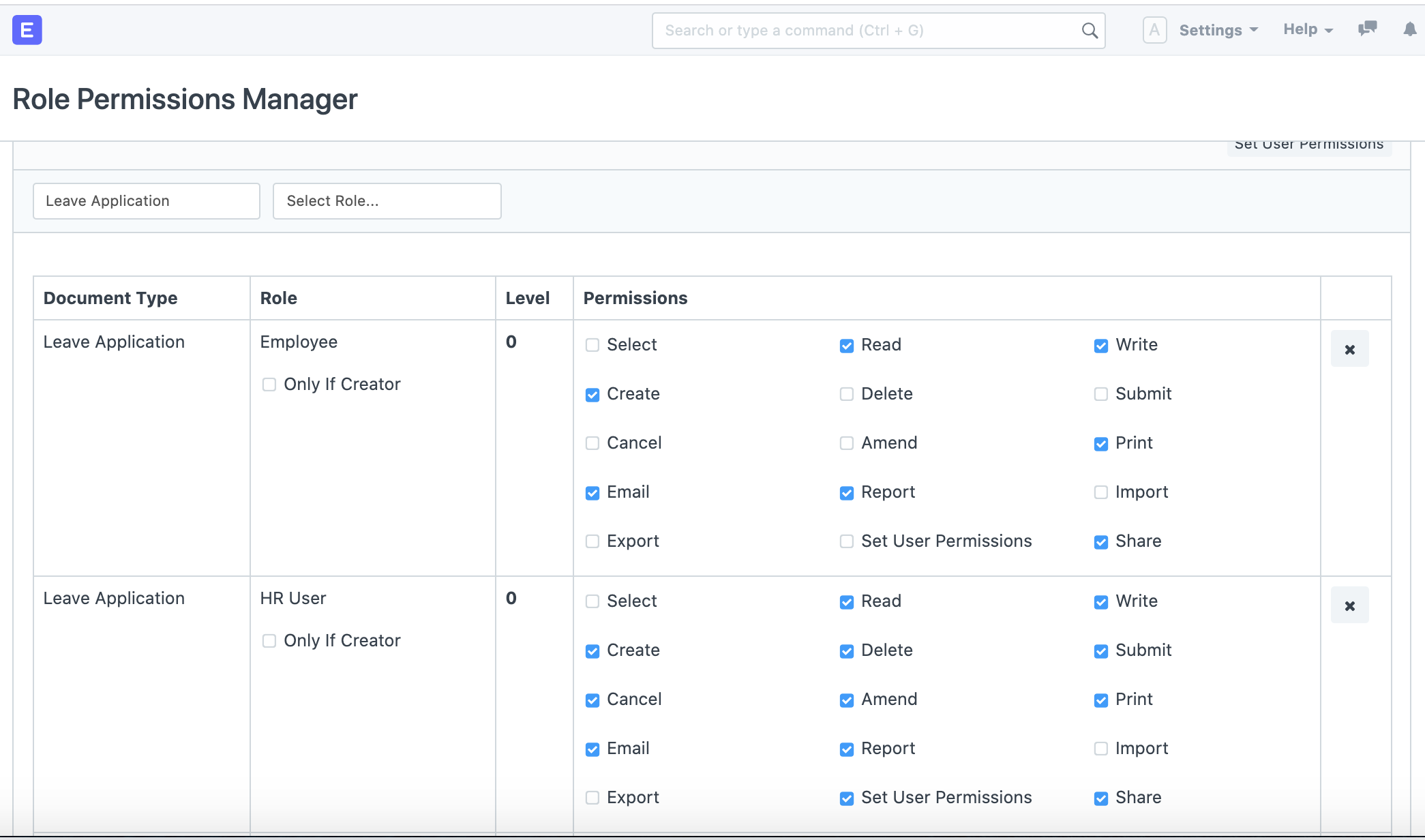
Define document access and actions through roles, permission levels and user restrictions.
Create report views using filters, columns, grouping and aggregate functions for operational analysis.
ERP customisation decisions should be based on the business outcome, maintenance impact, security model and upgrade path—not a preference for custom code.
Use when settings, fields, roles, workflows or print tools can meet the requirement safely.
Preferred starting pointUse front-end customisation for additional fields, layouts and user-facing document behaviour.
Low-code changeUse a Frappe application when the requirement introduces reusable business logic, new models or larger capabilities.
Structured extensionUse REST APIs when another approved system must remain responsible for part of the process or data.
Connected architectureStrong ERP customisation is controlled, documented and tested. The aim is to improve fit while preserving a clear upgrade and support path.
Check whether ERPNext already provides the required behaviour before creating a new extension.
Every custom field, report, workflow or app should have a clear owner and purpose.
Re-test roles, permission levels and data exposure whenever forms or workflows change.
Keep custom logic isolated appropriately and regression-test important workflows after platform changes.
ERP customisation in ERPNext can include front-end form changes, custom fields, field properties, print formats, reports, workflows, permissions and other configurable behaviour. Larger requirements can also be implemented through custom applications on the Frappe Framework.
Yes. Customize Form allows custom fields to be added and standard field properties to be adjusted from the front end, which is generally preferable to modifying core application code.
Yes. ERPNext includes Print Format tools that support customised layouts, drag-and-drop fields, custom text and HTML. Advanced print formats can also be created with custom HTML and Jinja where appropriate.
Yes. ERPNext uses role-based permissions. Roles can be given permissions such as read, write, create, submit, amend, print, email, import or export, with additional controls for permission levels and user permissions.
Yes. Report Builder can create reports from a DocType and child records using configurable filters, columns, grouping and aggregate functions. More advanced report types are also available when required.
No. Good ERP customisation starts by assessing standard ERPNext functionality first. Customisation should solve a genuine requirement without creating unnecessary maintenance, upgrade or support complexity.
Yes. ERP customisation can include approval workflows, state transitions, Frappe REST APIs and custom applications where standard configuration is not enough.
Use standard configuration first, document every change, isolate custom logic appropriately, control permissions, use version control for custom applications and test important workflows before upgrades or production releases.
Describe the users, process, missing data, reporting need, document layout or integration requirement. We can map the safest ERP customisation approach before configuration or development begins.