
General accounting
Structure financial activity around a controlled Chart of Accounts.
ERP accounting software should connect finance with the operational data behind every transaction. ERPNext connects accounting, receivables, payables, banking, budgets and financial reporting with operational ERP data so finance teams work from one controlled source of financial truth.

Structure financial activity around a controlled Chart of Accounts.
Track balances, ageing, payments and outstanding exposure.
Bring statement activity into controlled ERP reconciliation workflows.
Generate Balance Sheet, Profit & Loss, Cash Flow and management analysis.
ERP accounting software becomes more valuable when accounting stays connected to Buying, Selling, Stock, Manufacturing, Assets and Projects. ERPNext lets finance analyse the financial impact of transactions without rebuilding operational data in a separate accounting system. For product-level reference, see the official ERPNext Accounts documentation and ERPNext product overview.
A clean Chart of Accounts gives finance a stable reporting structure for assets, liabilities, equity, income and expenses.
Operational transactions can create the accounting effect required by the configured financial model, reducing duplicate finance entry.
Analyse financial performance by organisational or project dimensions where those dimensions are used on transactions.
Support alternative accounting contexts where finance-book reporting is relevant to the organisation.
Use Journal Entries for appropriate adjustments and financial entries while keeping a complete ERP audit trail.
ERP accounting software should reduce dependence on exported spreadsheets. ERPNext includes standard financial statements and reporting tools for Balance Sheet, Profit & Loss, Cash Flow, receivables, payables and other finance analysis.
Use ERP transactions as the reporting source instead of re-keying and reconciling multiple offline spreadsheets each month.

Combine financial reports with project, sales, inventory and purchasing context to support stronger financial review.
ERP accounting software can bring receivables and payables into one controlled view. ERPNext helps finance teams review outstanding balances, ageing and payment allocations across customers and suppliers.
Use open balances and ageing analysis to prioritise collection activity and reduce blind spots in customer exposure.
Review payable ageing and supplier exposure before outgoing cash commitments are made.
ERP accounting software should make reconciliation part of the finance workflow rather than a separate month-end task. ERPNext can maintain company bank accounts, bank transactions and reconciliation workflows, while imported or synchronised statement activity can be matched against ERP vouchers.
Create the bank and account records used by finance transactions and reconciliation.
Import or synchronise bank statement transactions using the available method for the environment.
Reconcile bank transactions with payment entries, journals and other relevant accounting records.
Identify unmatched transactions and resolve differences before they become month-end surprises.
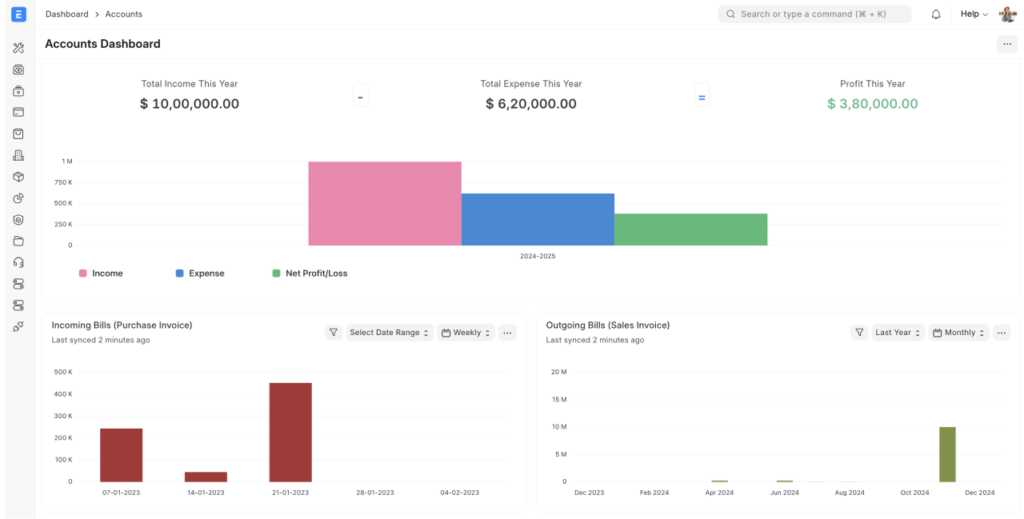
ERP accounting software can apply budget controls before overspend reaches reporting. ERPNext budgeting can be used against dimensions such as cost centres and projects, with configurable controls that can warn or stop selected transactions when budget limits are exceeded.
Set budgets for relevant organisational dimensions and accounting periods.
Use configured warnings or stops before selected transactions exceed approved financial limits.
Review real financial activity against budget and management reporting dimensions.
ERP accounting software works best when finance can review the effect of procurement, sales, inventory and projects without maintaining parallel systems. ERPNext Accounting connects those operational modules directly to the financial layer.
ERP accounting software such as ERPNext uses double-entry bookkeeping and connects financial data with Buying, Selling, Stock, Manufacturing, Assets and Projects. Core capabilities include Chart of Accounts, receivables, payables, bank transactions, reconciliation, journals, budgets and financial statements.
Yes. ERPNext provides receivable and payable reports, ageing views, payment allocation and reconciliation so finance teams can monitor customer and supplier balances.
Yes. Bank transactions can be imported or synchronised where supported, then reconciled against ERP vouchers using bank reconciliation tools.
Yes. ERPNext includes standard accounting statements such as Balance Sheet, Profit and Loss and Cash Flow, with options to analyse periods, cost centres, projects, finance books and currencies depending on the report.
Yes. ERPNext supports Financial Report Templates and configurable reporting tools for structured financial statements and management analysis.
Yes. ERPNext supports budgets against dimensions such as cost centres and projects, and configured controls can warn or stop selected transactions when budget limits are exceeded.
Yes. Companies can create and manage multiple bank accounts and use them for deposits, withdrawals, transfers, imported bank transactions and reconciliation.
Yes. ERPNext provides a broad finance foundation covering accounting ledgers, receivables, payables, banking, assets, budgeting, tax-related configuration and financial reporting. Specialist treasury, regulatory, consolidation or financial-services requirements may still require additional configuration or integration.
Tell us about your Chart of Accounts, receivables, payables, bank reconciliation, budgets, financial statements and finance controls. We can map where ERP accounting software should connect those workflows before implementation.